AutoRAF - Automating Regulatory Activation File for Cisco WLC
TL;DR
Automated installation of the Regulatory Activation File (RAF) on a Cisco 9800 WLC via EEM and in this case AWS S3 and AWS Lambda.
Background
For Cisco Wi-Fi 7 Access points, regulatory domains are no longer a thing. Therefore each AP needs to learn which country it may operate in. There is a number of ways to do this, and I would recommend you read this Deployment Guide
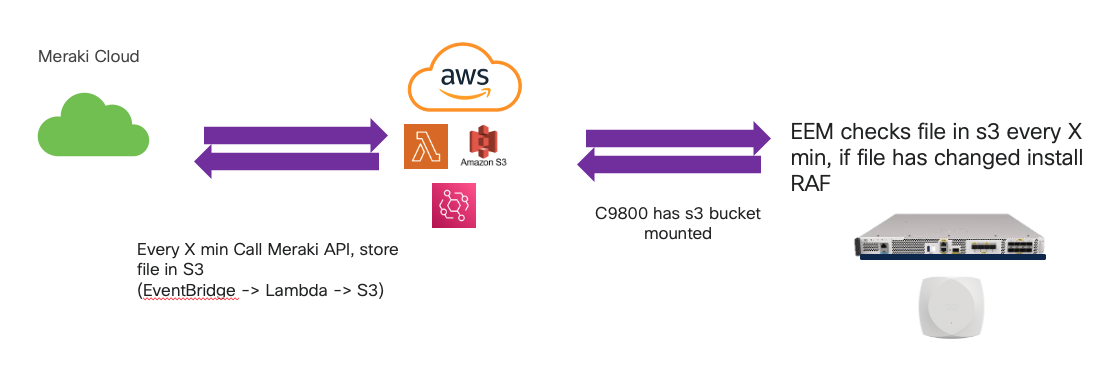
Overall flow
- Every X minutes a AWS lambda is invoked via AWS EventBridge
- This lambda calls the Meraki
RAF APIwhich returns the RAF file content - The returned content is stored in a s3 bucket
- The s3 bucket is mounted (natively) on the Cisco 9800 WLC
- Every Y minutes, an EEM script runs
- The EEM script copies the file from the s3 mount point on to local flash
- If the local flash version is different from the currently installed RAF, determined by a hash - install the new file!
Note: This is not tested as production code, use this as inspiration
Still Work in progress:
- Add more screenshots in write up
- Add a demo video
- Create a github repo for the EEM and python code, for feedback and issues
Prereqs
- You have a Meraki org setup
- You have set the country code for the Meraki Networks
Generating the RAF
To get the RAF we will use the Meraki API generateOrganizationWirelessControllerRegulatoryDomainPackage
NOTE: As of the time of writing, the API is in “early access”, to enable this for your Meraki Organization, go to “Organization” -> “Early access” and enable “Early API Access”
The AWS part
Okay, so now we just have to invoke the API from above automatically
Here is the plan; Use a bit of code to invoke the API and store the content in S3.
Prereqs/Things you should setup (I won’t show you how in the first version of the doc)
- A S3 bucket (I’ve called mine “ns-raf01”)
- Create a AWS Lambda, I setup mine as python 3.12
- Generate a Meraki API key, store this in a an enviroment variable called
API_AUTH_TOKENin the Lambda - Test the Lamdba - you will probably want to create a CloudWatch instance to store logs, and IIRC the AWS console will prompt you
- Once the Lambda works; create a
Schedulein AWS EventBridge to call the Lambda.
Add the following python code to the lambda. I couldn’t be bothered to code this my self, so this is vibecoded (i.e. thanks ChatGPT)
import json
import boto3
import requests
from datetime import datetime
import os

def lambda_handler(event, context):
    # Configure these variables
    api_url = 'https://api.meraki.com/api/v1/organizations/1203982/wirelessController/regulatoryDomain/package/generate'  # Replace with your API endpoint
    bucket_name = 'ns-raf01'  # Replace with your S3 bucket name

    # Get the authorization token from an environment variable
    auth_token = os.environ.get('API_AUTH_TOKEN')

    if not auth_token:
        print("Error: API_AUTH_TOKEN environment variable is not set")
        return {
            'statusCode': 500,
            'body': json.dumps('API authorization token is missing')
        }

    # Set up the headers with the authorization token
    headers = {
        'Authorization': f'Bearer {auth_token}',
        'Content-Type': 'application/json'
    }

    # Make the POST request to the API
    try:
        response = requests.post(api_url, json=event, headers=headers)
        response.raise_for_status()  # Raises an HTTPError for bad responses
        api_data = response.json()
    except requests.exceptions.RequestException as e:
        print(f"Error calling API: {e}")
        return {
            'statusCode': 500,
            'body': json.dumps('Error calling API')
        }

    # Generate a unique filename using the current timestamp
    timestamp = datetime.now().strftime("%Y%m%d_%H%M%S")
    filename = f"api_response_{timestamp}.json"

    # Save the API response to S3
    s3 = boto3.client('s3')
    try:
        s3.put_object(
            Bucket=bucket_name,
            Key=filename,
            Body=json.dumps(api_data, indent=2),
            ContentType='application/json'
        )
        print(f"File {filename} saved to S3 bucket {bucket_name}")
    except Exception as e:
        print(f"Error saving to S3: {e}")
        return {
            'statusCode': 500,
            'body': json.dumps('Error saving to S3')
        }

    return {
        'statusCode': 200,
        'body': json.dumps('API response saved to S3 successfully')
    }
So, the above stores the RAF as ns_regulatory_domain_blob.json in the ns-raf01 bucket
The WLC part
Mount S3 on the WLC
I used this video as a reference as it was made by one of my co-workers from the switching team.
But, in short
- Create an access key for the bucket
- Update your WLC config as follows (Make sure your region and bucket name are adjusted accordingly
cloud-services aws s3 profile ns_test_s3
 access-key key-id <KEY-ID> secret-key 0 <SECRET>
 bucket ns-raf01 mount-point s3raf
 region us-east-1
 no shutdown
end
NOTE: This will fail if the WLC doesn’t have a DNS server set (yes, I forgot and this lead to some very in-depth troubleshooting)
If done right you can run show cloud-services aws s3 sum
c9800-1715#show cloud-services aws s3 summary
Profile Name                      Profile Status  Service Status
-----------------------------------------------------------------
ns_test_s3                        Started         Active

c9800-1715#
and you can check that you can access the files
c9800-1715#dir cloudfs:s3raf
Directory of cloudfs:/s3raf/

4294967295  -rw-            18638  Aug 11 2025 05:08:04 +00:00  ns_regulatory_domain_blob.json
4294967295  -rw-            18638  Aug 11 2025 04:53:23 +00:00  api_response_20250811_045319.json
4294967295  -rw-            18638  Aug 11 2025 04:38:52 +00:00  api_response_20250811_043848.json
4294967295  -rw-            15123  Oct 12 2024 18:06:43 +00:00  api_response_20241012_180639.json
4294967295  -rw-            12043   Oct 8 2024 05:43:29 +00:00  regulatory_domain_blob.json

14785671168 bytes total (475009024 bytes free)
c9800-1715#
The EEM part
I could not have done this without the help from Joe Clarke, the EEM Guru. Fun fact: LLMs are very bad at EEM.
conf t
event manager environment md5_checksum

event manager applet AutoRAF
 event timer watchdog time 300
 action 1.0 cli command "enable"
 action 1.1 cli command "verify /md5 bootflash:.cloudfs/s3raf/ns_regulatory_domain_blob.json"
 action 1.2 regexp "= ([a-fA-F0-9]*)" "$_cli_result" match current_md5
 action 1.3 if $_regexp_result eq "0"
 action 1.4  syslog msg "Failed to extract MD5 checksum!"
 action 1.6 else
 action 2.1  if $current_md5 ne "$md5_checksum"
 action 2.3   syslog msg "MD5 checksum change detected for ns_regulatory_domain_blob.json (old: $md5_checksum, new: $current_md5)"
 action 2.4   cli command "config t"
 action 2.5   cli command "event manager environment md5_checksum $current_md5"
 action 2.6   cli command "end"
 action 3.0   syslog msg "Copying RAF from S3 to flash:regulatory. First we delete it to make the EEM script cleaner"
 action 3.1   cli command "delete /force flash:regulatory/ns_regulatory_domain_blob.json"
 action 3.2   syslog msg "Delete done, copy file"
 action 3.2   cli command "copy bootflash:.cloudfs/s3raf/ns_regulatory_domain_blob.json flash:regulatory/ns_regulatory_domain_blob.json" pattern "ns_regulatory"
 action 3.3.  cli command "regulatory/ns_regulatory_domain_blob.json"
 action 3.3   syslog msg "File copy done. Activating RAF"
 action 4.0   cli command "ap regulatory activation file ns_regulatory_domain_blob.json"
 action 4.1   cli command "ap regulatory activation apply"
 action 4.2   syslog msg "RAF activated, check result with <show ap regulatory activation all>"
 action 5.0  end
 action 5.1 end
The EEM script will run after approx 5 min, use the following commands to debug
- Check the last run of the script
show event manager history events - Check the EEM environment variable
show event manager environment - Check if the RAF got updated
show ap regulatory activation all(or replace “all” with “mac” to filter specific mac)
Important
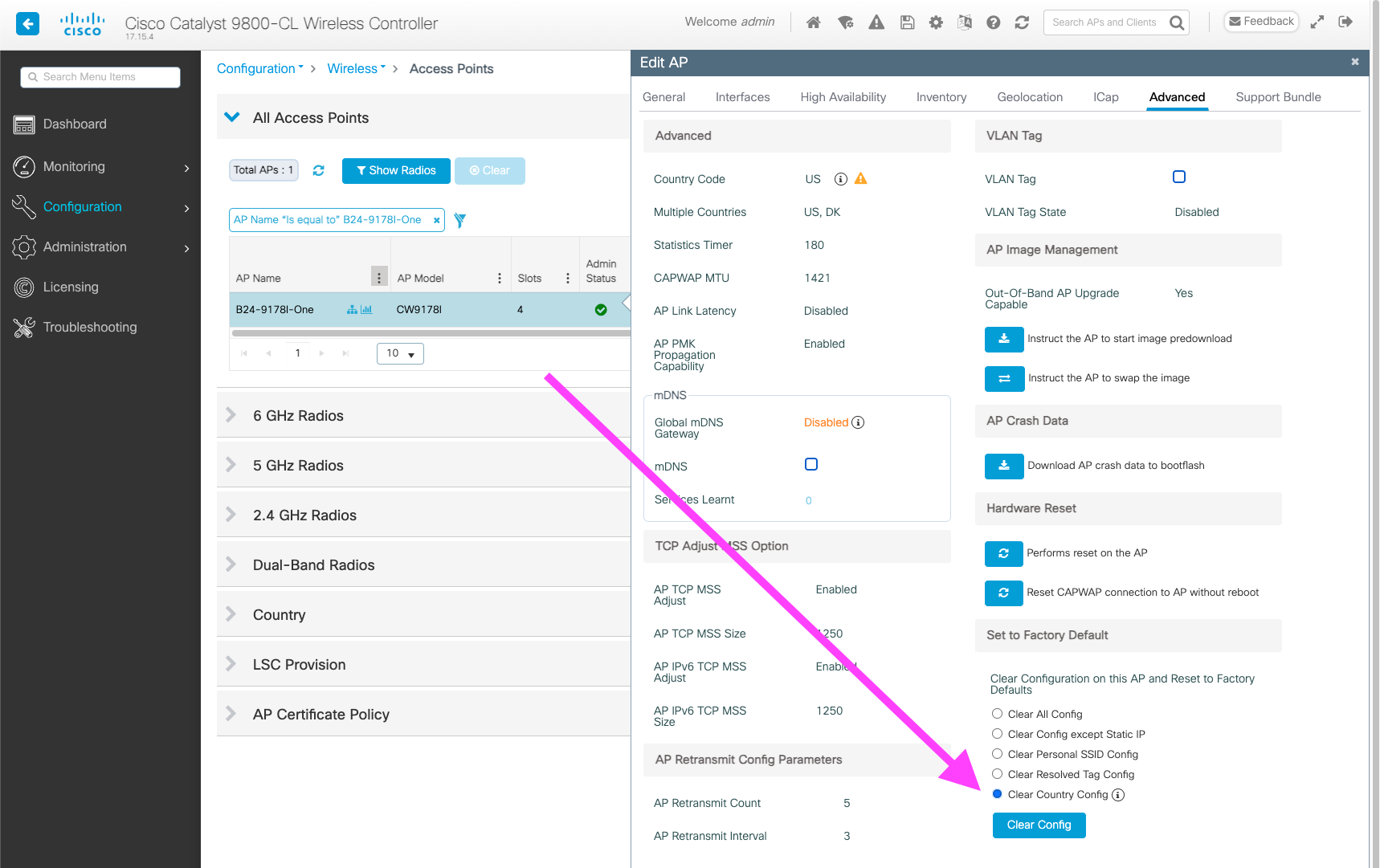
The AP will not change the “running country code” (i.e. change behaviour) when the RAF is updated. To trigger an AP to “relearn” country (including querying the most recent RAF), use either
c9800-1715#clear ap name <name of the AP> country
Or from WebUI:
Q&A
-
Q: Why EEM and not python? A: Why not? Also not virtual WLCs do not have python support
-
Q: Why AWS stack? A: To learn a bit more about AWS, and also because IOS-XE has native S3 mouting capabilities(how cool is that!)
-
Q: Could the RAF be on a FTP/SFTP/SCP/HTTP server instead of S3? A: Sure, you could even have a script on a server download the RAF and push the RAF to the WLC
-
Q: Why doesn’t the EEM script pull the RAF directly from the Meraki API? A: The main reason: EEM does not support (to my knowledge) a way to issue a HTTP POST request, which is needed for the RAF API. Also, the current implementation showcases the s3 integration, whilst also not storing the Meraki API key in the WLC config
Optimizations
There are a number of optimizations that could be implemented
- Do a version check in the lambda, as to not store a new RAF in s3 every time